Table of Contents
On the CompTIA Security+ (SY0-701) exam, candidates face a testing format distinct from traditional multiple-choice questions: Performance-Based Questions (PBQs).
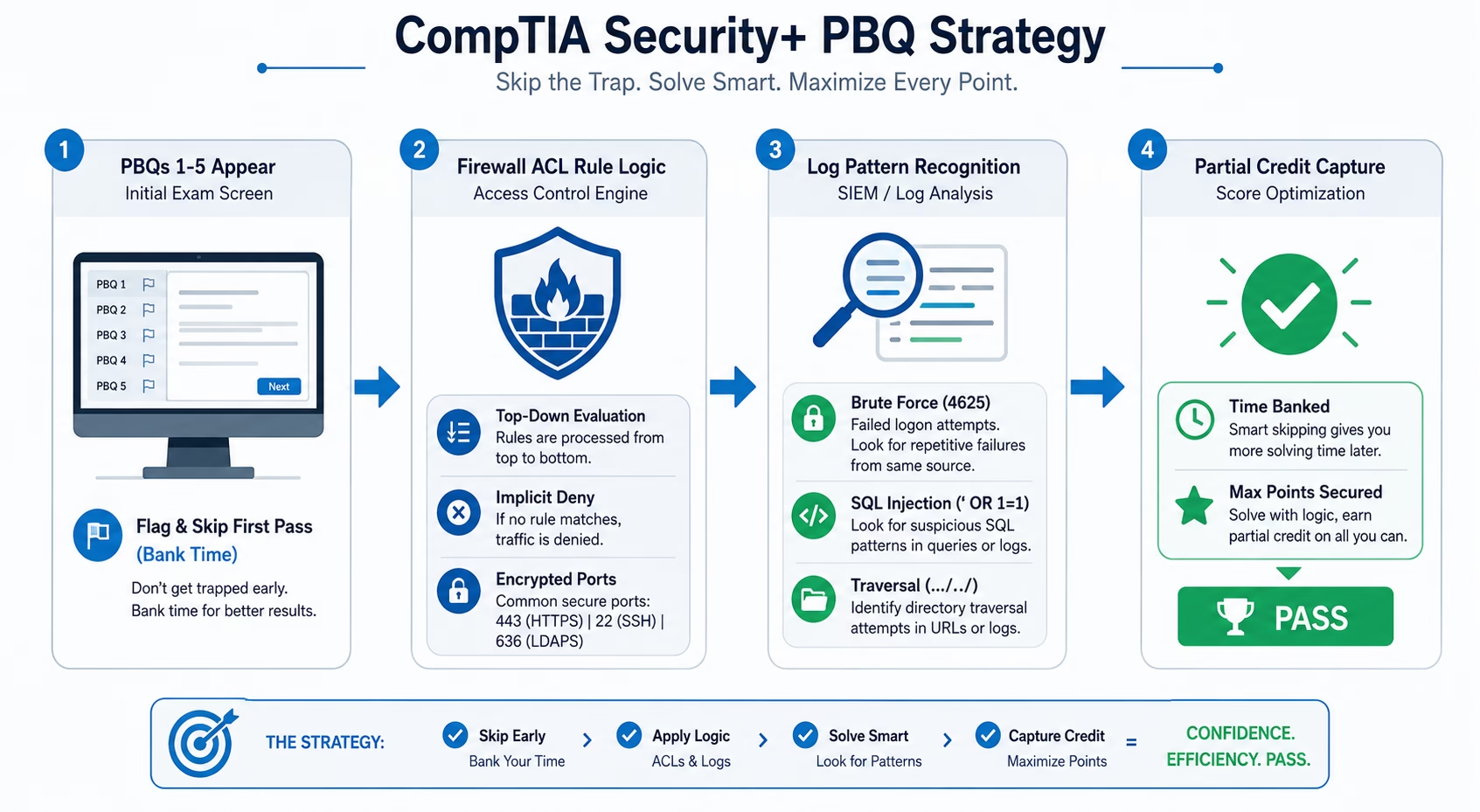
PBQs appear right at the beginning of the exam (typically questions 1 through 5). Instead of asking you to define terms, they place you inside simulated environments—requiring you to configure firewall Access Control Lists (ACLs), analyze SIEM authentication logs, remediate network diagrams, or identify active attack signatures.
Because PBQs test practical execution and carry significant scoring weight, mismanaging them can consume your 90-minute time limit. Mastering the recurring PBQ patterns and applying a structured execution plan ensures you capture maximum points on test day.
1. How CompTIA Grades PBQs: Partial Credit Mechanics
A common misconception is that PBQs are graded on an “all-or-nothing” basis. In reality, CompTIA awards partial credit for individual sub-tasks within a PBQ simulation.
- If a firewall configuration PBQ has 6 separate rule dropdowns, getting 5 correct still earns the majority of the points allocated to that question.
- The Golden Rule: Never leave any part of a PBQ blank. If you are uncertain about a specific dropdown or setting, make your best reasoned choice based on the principle of least privilege.
2. The 3 Most Common SY0-701 PBQ Scenarios
Scenario A: Firewall ACL Configuration & Rule Ordering
In firewall PBQs, you are presented with a network topology and a stated enterprise security policy. Your task is to set each rule to Allow or Deny across source IP, destination IP, protocol, and port.
Core Rules of Firewall PBQs:
- Top-Down Evaluation: Firewall rules process sequentially from top to bottom. The first rule that matches the packet is executed, and processing stops.
- Specific Rules First, General Rules Last: Place strict deny rules (e.g., blocking a specific malicious IP subnet) above broad permit rules.
- Implicit Deny: Every firewall ends with an unwritten Deny All Traffic rule. You only need to explicitly write rules for authorized communication paths.
- Swap Insecure for Secure Protocols: Always block unencrypted legacy protocols in favor of secure encrypted alternatives:
- Replace HTTP (Port 80) with HTTPS (Port 443)
- Replace Telnet (Port 23) with SSH (Port 22)
- Replace LDAP (Port 389) with LDAPS (Port 636)
- Replace FTP (Port 21) with SFTP (Port 22)
Scenario B: Security Log Analysis & Incident Classification
Log analysis PBQs present snippets from Linux auth.log, Windows Event Viewer, or Web Server logs, asking you to identify the malicious event and classify the attack type.
Key Log Signatures to Recognize Instantly:
- Brute Force / Password Spraying: Hundreds of failed authentication attempts (Status: FAILED – user: root or Event ID 4625) from a single external IP address within seconds.
- SQL Injection (SQLi): Web request logs containing input strings like ‘ OR ‘1’=’1, UNION SELECT, or –.
- Directory Traversal: URL requests containing consecutive ../../ or %2e%2e%2f attempting to access /etc/passwd or C:\Windows\System32.
- Port Scanning / Reconnaissance: Sequential SYN connection attempts from one source IP hitting multiple consecutive destination ports (e.g., ports 21, 22, 23, 25, 80, 443, 3389) in rapid succession.
Scenario C: Wireless Security & Network Device Placement
This PBQ requires dragging security controls (Firewalls, WAFs, IDS/IPS, Reverse Proxies) into appropriate network zones or configuring Wi-Fi authentication settings.
- DMZ Placement: Public-facing web servers and mail relays belong in the Demilitarized Zone (DMZ), isolated from internal enterprise subnets.
- Database Isolation: Database servers must reside in the private internal network, reachable only by the application tier via designated database ports (e.g., MySQL 3306, MS SQL 1433), never directly from the public internet.
- Enterprise Wi-Fi: Corporate wireless networks must use WPA3-Enterprise paired with 802.1X / RADIUS for individual user credentials, rather than a shared Pre-Shared Key (PSK).
3. The 3-Step Exam Day Time Management Strategy
Because PBQs appear on your screen first, spending 10 minutes on question 1 creates time pressure for the remaining 80+ multiple-choice questions. Use this battle-tested strategy:
- Step 1 — Flag and Skip on First Pass: When the exam begins and PBQ #1 appears, review it for 15 seconds. If the answer is not immediately obvious, Flag the question for review and click “Next” immediately. Skip through all PBQs to begin with the multiple-choice section.
- Step 2 — Bank Time on Multiple Choice: Answer all standard multiple-choice questions quickly (aiming for roughly 45–50 seconds per question). This builds momentum and banks 25 to 30 minutes of remaining time.
- Step 3 — Return to PBQs with Full Focus: Return to your flagged PBQs with banked time. You can now analyze logs, trace network routes, and configure ACLs methodically without the fear of running out of time.
Key Takeaways
- PBQs appear in questions 1–5 on the Security+ exam and award partial credit—never leave any dropdown or configuration field empty.
- Firewall ACLs evaluate top-down; always enforce specific rules above general ones and swap insecure plaintext protocols for encrypted equivalents.
- Flag all PBQs at the start of your exam, complete the multiple-choice questions first to bank time, and return to finish PBQs with a clear head.