
Table of Contents
You know that stomach-dropping feeling when you realize you just deleted the wrong file? Or when your hard drive makes that ominous clicking sound and suddenly everything goes dark? That’s where backup and recovery come in. They’re not just buzzwords in your Security+ or CISSP exam syllabus. They’re the difference between a minor inconvenience and a career-ending data disaster.
Let’s talk about this like we’re having coffee at 2 AM during a study session. Because honestly, if you’re prepping for CISA or CISM, you’ve probably been there.
What Is Backup Really?
Backup is simple in theory. You make copies of your data so you have something to fall back on when things go wrong. But here’s what most people miss: having a backup and having a backup that actually works are two completely different things.
Think about it this way. You’ve got your “AI Reels Maker” project on GitHub right? That’s a form of version control backup. Every commit is a snapshot you can revert to. Now imagine if GitHub disappeared tomorrow and you had no local copy. That’s why real backup strategies go beyond just one layer of protection.
The Main Types of Backup
Full Backup
This one does exactly what it says. You copy everything. Every file, every database, every configuration setting. It’s thorough. It’s also slow and eats up storage like crazy.
When would you use this? Small environments where you need to get back up and running fast. Or as the foundation of a larger backup strategy where you do a full backup weekly and something else on the other days.
Incremental Backup
Now this is where things get interesting. Incremental only backs up what changed since your last backup of any kind. So if you did a full backup on Sunday, Monday’s incremental only grabs Monday’s changes. Tuesday’s incremental only grabs Tuesday’s changes. You see the pattern.
The upside? You’re saving a ton of space. The downside? Recovery becomes a puzzle. You need that original full backup plus every single incremental backup in order. Miss one piece and you’re stuck.
Differential Backup
This one sits in the middle. It backs up everything that changed since the last full backup. So your Sunday full backup stays the same. Monday’s differential grabs Monday’s changes. Tuesday’s differential grabs both Monday and Tuesday’s changes. Wednesday gets all three days worth.
Recovery is faster than incremental because you only need two pieces: the full backup and the latest differential. But your backup size grows each day until the next full backup resets the cycle.
Mirror Backup
Mirror creates an exact copy in real time. Change a file on your main system? That change instantly appears on the mirror. It’s like having a twin that does everything you do.
Sounds great until ransomware hits. The encrypted files on your main system? They get mirrored instantly. Now you’ve got two copies of garbage instead of one. Mirror is fast but it doesn’t protect against everything.
Continuous Data Protection
CDP watches every single change and records it. You can roll back to any point in time, not just when your scheduled backups ran. Financial systems love this. Imagine being able to undo a database transaction from 17 minutes ago with surgical precision.
The tradeoff? It’s resource hungry and complicated to set up. But for mission-critical systems where even five minutes of data loss is unacceptable, it’s worth it.
The GitLab Incident: A Backup Horror Story
February 2017. GitLab’s production database got wiped. Three hundred gigabytes of data. Gone in seconds.
Here’s what happened. A technician needed to clear a secondary database. Instead they ran the command against production. Five thousand projects. Five thousand comments. Seven hundred new user records. All deleted.
Then the real nightmare began. Their backups failed. Not one. All of them. The scheduled backups were overloaded. The off-site replication was misconfigured. The only thing that worked was an LVM snapshot from six hours earlier.
Eighteen hours of recovery work. They got most of it back. But six hours of data was just gone. Forever.
What can we learn from this?
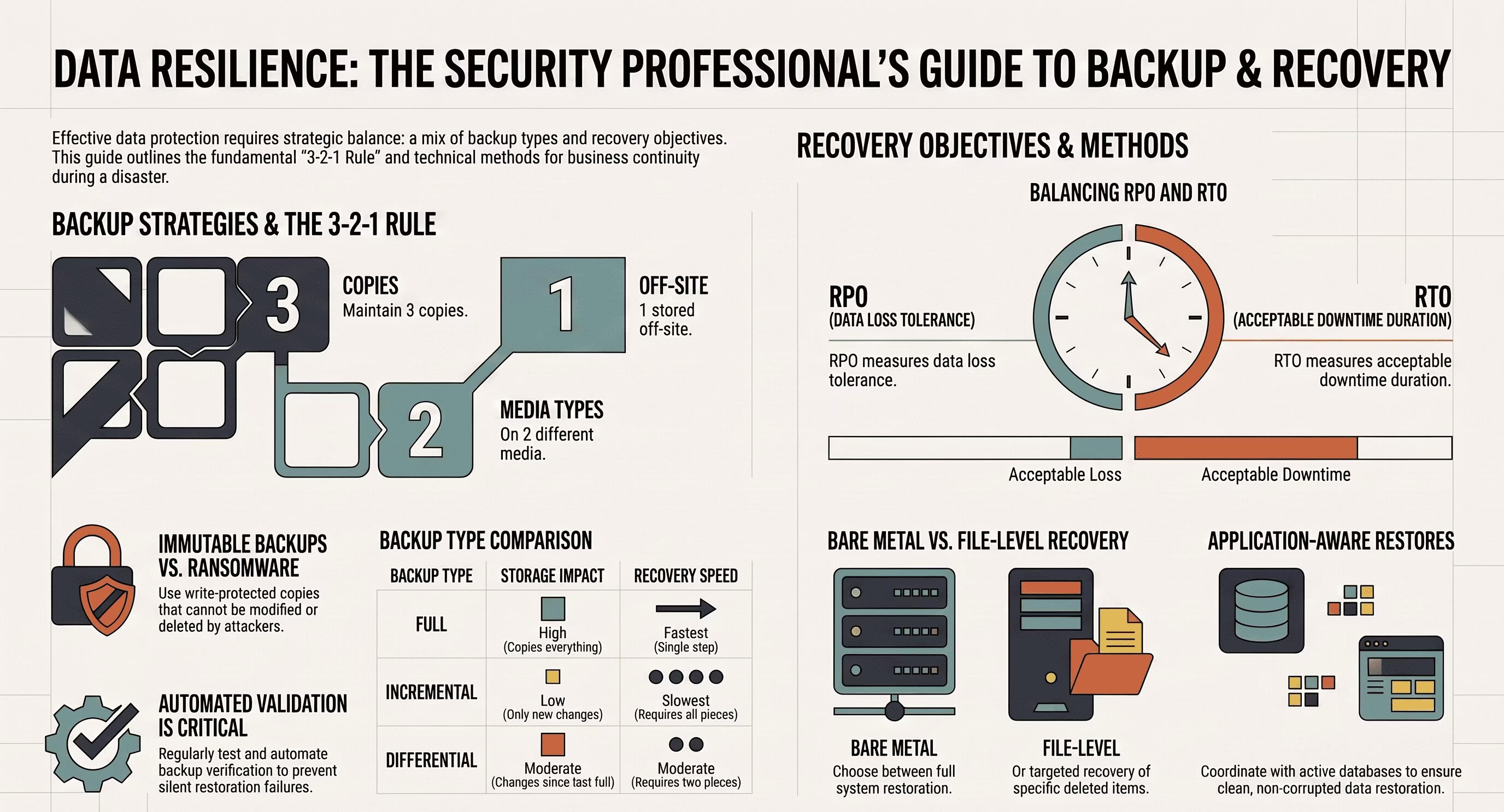
First, verify your backups actually work. Don’t assume. Test them. Second, follow the 3-2-1 rule. Three copies of your data. Two different types of storage media. One copy off-site. Third, automate your backup validation so you catch failures before disaster strikes.
What Is Recovery?
Recovery is what happens after the backup. You’ve got your data copies. Now you need to get them back into a usable state when something breaks.
This is where your Recovery Time Objective and Recovery Point Objective come in. RTO is how fast you need to be back online. RPO is how much data loss you can tolerate.
If your RTO is four hours but your recovery process takes eight hours, you’ve got a problem. If your RPO is one hour but your backups run once a day, you’ve got a different problem. These aren’t just exam concepts. They’re business requirements that drive your entire backup strategy.
Recovery Types You Need to Know
Bare Metal Recovery
This is the full rebuild. Your server is toast. Hardware failure, fire, flood, doesn’t matter. You’ve got nothing but bare metal and a backup. BMR restores the entire system: operating system, applications, configurations, data. Everything.
It’s the most complete recovery option. It’s also the most complex. You need detailed documentation and tested procedures or you’ll be rebuilding from scratch.
File-Level Recovery
Sometimes you don’t need the whole system back. Just that one file someone accidentally deleted. Or that one database table that got corrupted. File-level recovery targets specific items without touching the rest of the system.
This is faster and less disruptive. It’s also what you’ll use most often in day-to-day operations.
Application-Aware Recovery
Databases and enterprise applications aren’t just files sitting on disk. They have active connections, transaction logs, memory states. If you restore them like regular files, you’ll end up with corruption.
Application-aware recovery coordinates with the running application to ensure a clean restore. It’s more complex but it’s the only way to properly recover systems like SQL Server, Exchange, or Oracle.
Enterprise Scenarios: Where This All Comes Together
Scenario 1: Ransomware Attack
A hospital gets hit with ransomware at 3 AM. Every workstation is encrypted. Patient records locked. Scheduling systems down.
Their backup strategy saves them. Daily full backups stored off-site with immutable copies that ransomware can’t touch. They restore from the backup from two days ago. They lose 48 hours of data but the hospital stays operational.
The key here? Immutable backups. Once written, they can’t be modified or deleted for a set period. Even if attackers get admin access, they can’t encrypt your backups.
Scenario 2: Data Center Failure
A cloud provider has an outage. Your entire production environment is in that region. Suddenly everything is inaccessible.
Your disaster recovery plan kicks in. Automated failover to a secondary region. DNS switches over. Users experience a few minutes of disruption but the service comes back online.
This is where geographic redundancy matters. Your backups should live in different physical locations. Regional disasters shouldn’t take out both your primary and your backup.
Scenario 3: Accidental Mass Deletion
A junior admin runs a script in production they tested in dev. The script deletes records. Hundreds of thousands of them.
The DBA team gets pulled in at midnight. They pull the backup from that morning. They restore to a separate server. They extract the missing records. They carefully merge them back into production.
Total downtime? Two hours. Data loss? Minimal. The difference between a late night and a headline-making disaster came down to having recent, tested backups.
Building Your Backup Strategy
So what does this mean for your work as a security professional?
Start with the 3-2-1 rule. Keep three copies of critical data. Use two different storage types like local disk and cloud storage. Keep one copy off-site or in a different region.
Test your recovery procedures regularly. A backup you can’t restore from is worse than no backup at all. It gives you false confidence. Schedule quarterly recovery drills. Document what works and what doesn’t.
Know your RTO and RPO for each system. Not everything needs the same level of protection. Your email server might tolerate 24 hours of data loss. Your transaction database might need near-zero RPO. Match your backup frequency and type to the business requirements.
Don’t forget about encryption. Your backups contain everything. If they’re not encrypted, you’re just giving attackers a complete copy of your data. Encrypt at rest and in transit.
Keep your backup infrastructure separate from your production network. If attackers compromise your production systems, you don’t want them having easy access to your backups too.
Real-World Tools and Approaches
What do enterprises actually use?
Veeam is everywhere. It handles virtual machines, physical servers, cloud workloads. It’s application-aware and integrates with most hypervisors.
Commvault shows up in large organizations. It’s enterprise-grade with strong deduplication and global management capabilities.
AWS Backup and Azure Backup handle cloud-native workloads. They integrate tightly with their respective platforms and handle a lot of the complexity for you.
For databases, you’ve got native tools. Oracle RMAN, SQL Server backup commands, PostgreSQL pg_dump. Know these because they’re often what you’ll be scripting against.
And never underestimate the power of good old rsync and tar on Linux systems. Sometimes the simplest tools are the most reliable.
Where to Learn More
If you want to go deeper, these resources are solid.
NIST Special Publication 800-34 covers contingency planning and disaster recovery. It’s the government standard and it’s free.
The SANS Institute has excellent backup and recovery guides. They’re written by practitioners for practitioners.
Microsoft’s documentation on backup and recovery is surprisingly good even if you’re not in a Microsoft environment. The concepts apply everywhere.
For the cloud side, AWS and Azure both have detailed backup architecture guides. They show you how to build resilient systems from the ground up.
Your certification prep materials will cover the exam-focused concepts. But the real learning happens when you build these systems yourself. Set up a lab. Break things. Restore from backup. That’s where the knowledge sticks.
Final Thoughts
Backup and recovery isn’t glamorous. You won’t get praise for restoring data nobody noticed was missing. But when disaster hits and you’re the one who brings everything back online? That’s when this work matters.
You’re studying for Security+, CISA, CISM, CISSP. These concepts will be on your exams. But more importantly, they’ll be in your daily work as a security professional. Understanding backup types, recovery procedures, and enterprise scenarios isn’t just about passing a test. It’s about being the person who keeps the lights on when everything else goes dark.
So next time you commit to GitHub or push a backup to your external drive, remember: you’re not just being cautious. You’re practicing the discipline that separates professionals from amateurs.